Game cams are great, when they work properly! Are you having trouble? I tried calling Customer Service about this issue and they never answered so I figured it out myself. Thought I would share my solution.
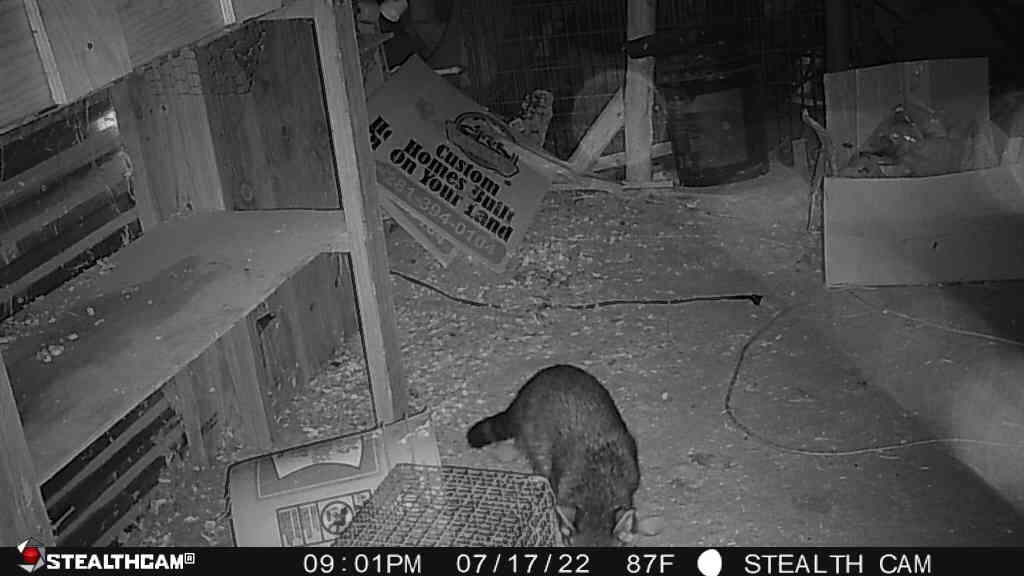
Our little friend kept evading the trap. But eventually he got caught. Raccoons are extremely clever and good at getting into small spaces, opening containers, and killing chickens. A camera can help you know what is going on.
Why is your Stealth CamTM not sending you photos?
Have you already tried SYNCING and you got a red light on the wireless connection? I may have a solution for you. Note: I think the Stealth Cam server may be having trouble as well.
Before proceeding try these simple fixes :
- Check that the batteries haven’t died and the SD card isn’t full.
- Check that your payment method is updated.
- You can also have a problem if the payment method you are using has been changed, such as when you get a new Debit or Credit card.
- Be sure your phone number is updated .
- Those are the first things to check. If that’s all good but you aren’t getting any downloads, then keep reading.
You may need to REACTIVATE your account
If you have let your payment method lapse or had your account suspended for some reason, it can cause a problem even after you restore your payment method and get a message saying your account has been restored. You may still need to REACTIVATE your account on the main website.
Steps to fix connection.
1. Make sure app is updated, batteries work, and there is an SD card installed.
2. Go to www.stealthcam.com in a web browser, login in with the email address and password that you chose on your app.
3. Click Account. Check status. If you see INACTIVE, then click ACTIVATE. That should fix it.
4. Got to camera, press SYNC button and let it go through the process again. You should receive a download of any photos that were taken while it was inactive.
Check the following things on your account website.


Different problem?
I called the following number and clicked through several options. They said to
1. Make sure your SD card is 32 Gb or less.
2. Do not use rechargeable batteries, use only regular lithium batteries.
3. Make sure antenna is securely attached.
Still need help? Here is the contact info .
 Blue Skies and Green Pastures
Camera is taking pictures but not sending them for 9 hours later. This does me no good when the camera is over a hog trap and i get pictures 9 hours after they go in the trap. I’ve re-booted, re-installed the battery pack, re-synced, everything. And I still get pictures 9 hours later. I can’t trap hogs like this using Stealthcam.
I saw a notice in their website about a backlog of photos . I can’t seem to find it again. You may need to replace the camera with a different brand . Mine broke last week so I am getting a different one.
I’m having this same issue while trying to activate my new camera , I’m getting a red light For connection everywhere I go and I know it should have good signal in these areas . It seems like I need to purchase a plan first but can’t get to that step till it’s activated. I’m using a reactor .
Did you download the app yet?
Also, try using the website to create your account first.
did you ever figure anything out
Did you figure this out? I’m having the same issue.
Your best best is to call them and go through all the steps on the recording and if it still doesn’t work, call again. Everything must be done in order and exactly right or it doesn’t work.
Did you ever get an answer on how to fix this?
Sorry, I no longer use this camera and won’t be updating this post.
There is no website?
You can go to their website at https://www.stealthcam.com/login/ in a browser like Chrome or Safari on your phone .
Same issues here. Won’t register or activate. And when trying to go to that website, it only shows a screen that says download the app to use all features.
Which browser did you use? When I click that link it takes me to a place to register for an account. I no longer have an account with them. My camera broke when the batteries leaked .
Having the same issues trying to activate 2 fusion x cameras. They will not register or activate. Older cameras work fine.
I am still having an issue with the camera confirming that I have an account set up. The camera had worked fine for months and is all of a sudden giving me trouble. Just a word of advice, don’t try to find the login portal at stealthcam.com. It has to be website: stealthcamcommander.com.
Also, the camera I am having an issue with is the Muddy Matrix, but as most of you would know, the CommandPro app is the app you use for both StealthCam, and Muddy cameras.
I will make it short – don’t buy a stealth camera, the product is lousy and customer service does not exist.
I have 3 stealth cams and 2 are working fine , but one is not responding . It shows full battery and signal 📶, empty SD card being they are brand new . I’m not getting any pictures from it and the on demand show activating but seems stuck. Would be no big deal to go try and push sync button but camera is in South Carolina and I’m in Florida. Any suggestions.
Is that a different model than the other ones? Honestly I am getting so many hits on the article that I can only assume there was a problem with some of their cameras . Sorry I don’t know if you can fix that remotely or at all. Call a neighbor in SC?
Old camera quit and tried to connect a new camera and couldn’t get it to work call customer service no response back !!
Honestly I would return it and buy a different one . They do not deserve their customers .
I have a Stealth Pro, older model , maybe 6-7 years old. Batteries died. Replaced them. It goes thru the 1,2,3 dot reboot, clears all, then immediately goes to 3 solid lights, and stays there. And again starts over. Any ideas ? Never had this issue. Plan to call them tomorrow. Thanks.
Sounds like it might be time to replace it. Good luck!