
Our lives and critical information are stored on our phones and computers. And yet, as important as they are, we don’t always think about what could happen if we lose access to that information.
Passwords
We all sometimes forget the numerous passwords that we use daily to log in. But do you really need to remember all those passwords for every website and account you have? It’s impossible to keep up with them and websites know it. So they will let you reset your password IF you know your email address.
The only passwords you really need are the ones that unlock your phone and computer and your email account.
As long as you have a password on your phone and computer, you can simply save the website passwords to your computer browser password manager. Or you can make up a few really complicated passwords using random numbers and letters and symbols and use them in many different accounts. Obviously if you don’t want to save your passwords to your computer and you can’t remember them, you will need to write them down and save them in a safe place where you won’t forget.

Don’t lose your email account
But even more critical, as long as you have access to your main email address and that password, you can always change your password to websites if you have your username. So you do need to write down the usernames to accounts that do not use your email address for the username, or use the same one every time so you don’t forget it.
In my job doing taxes I encountered many upset people who could not verify their identity with the IRS when they desperately needed to get information from the IRS website. This happened because they no longer had access to the email address they used to sign up for an account! Or they had trouble setting up an account because their identity was not easy to verify using normally available documents. Because of this they had to jump through time-consuming hoops, I mean weeks of waiting, to prove who they are just so they could get their tax refunds. This is very important! DO NOT LOSE ACCESS TO YOUR EMAIL ACCOUNT.
But what would cause you to lose access? If you forget your password they will want to send you an email. If you can’t log in to that email account, like Gmail, for example, without your Google password, you will have to have an alternate method. So be sure to set that up and save those passwords to your phone. Another possible issue is that you have lost your phone and can’t get into that email. I highly recommend having TWO ways to access the internet, even if you have to use the library or someone else’s computer. That way you can log in to your email account if you lose your phone so you can change passwords or get into your accounts. Obviously your passwords won’t be stored on someone else’s computer.
Set up alternate recovery methods for your email accounts. If you are a Google person and you use Google login for everything, make sure you set up recovery methods so you don’t lose access to your data.
Your Cell Phone
Another serious dilemma is when people get a new phone and cannot receive a text verification code to get into important accounts. This can really be difficult to overcome. When I broke my phone, I had to call Apple support on my landline to get into my account and set up an alternate method of verification ( I used my husband’s cell phone number)until I got another phone with the same number. I was lucky that I was keeping my same number. If you change your number you could be in big trouble if you have two-step verification set up for various accounts, especially your bank. You’ll need to call them and find a way to verify your identity without your phone. Also be sure you are doing regular phone backups to the cloud.
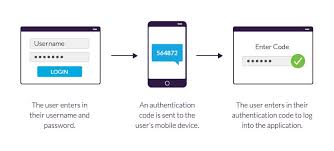
Your cell phone account is so important that other companies can use it to check your identity. Not only do they have your name and address, they have your social security number!
Summary
- Have one email address that you use for important accounts and make sure you can sign in without your phone.
- Keep your phone backed up and don’t change your number if you lose or break your phone.
- Use hard to guess passwords on most websites and say yes when asked to save them to your phone and computer browser.
- Protect your financial information by using difficult passwords and changing passwords frequently on accounts that have your banking and credit card information.
- Always use a password and fingerprint or facial recognition on your phone if you are storing account passwords on it.
- Set up account recovery methods. Do it now! For iphone: https://support.apple.com/en-us/HT212513 For Google: https://support.google.com/accounts/answer/183723?hl=en&co=GENIE.Platform%3DAndroid
- Don’t be 100% dependent upon your phone. Have two ways to access the internet. Laptops are cheap. Chromebooks are even cheaper.
 Blue Skies and Green Pastures
Solid advice. I thought about changing all my passwords to “incorrect.” That way, if I forgot it the system would tell me, “Your password is incorrect.”
Either that or “again” ‘cause then it says, “Try again.”😂
Actually I carry all my passwords in my wallet, but “coded” so even if my wallet was stolen, it would be very difficult to figure out what all the *, #, ? or other symbols represented.😉